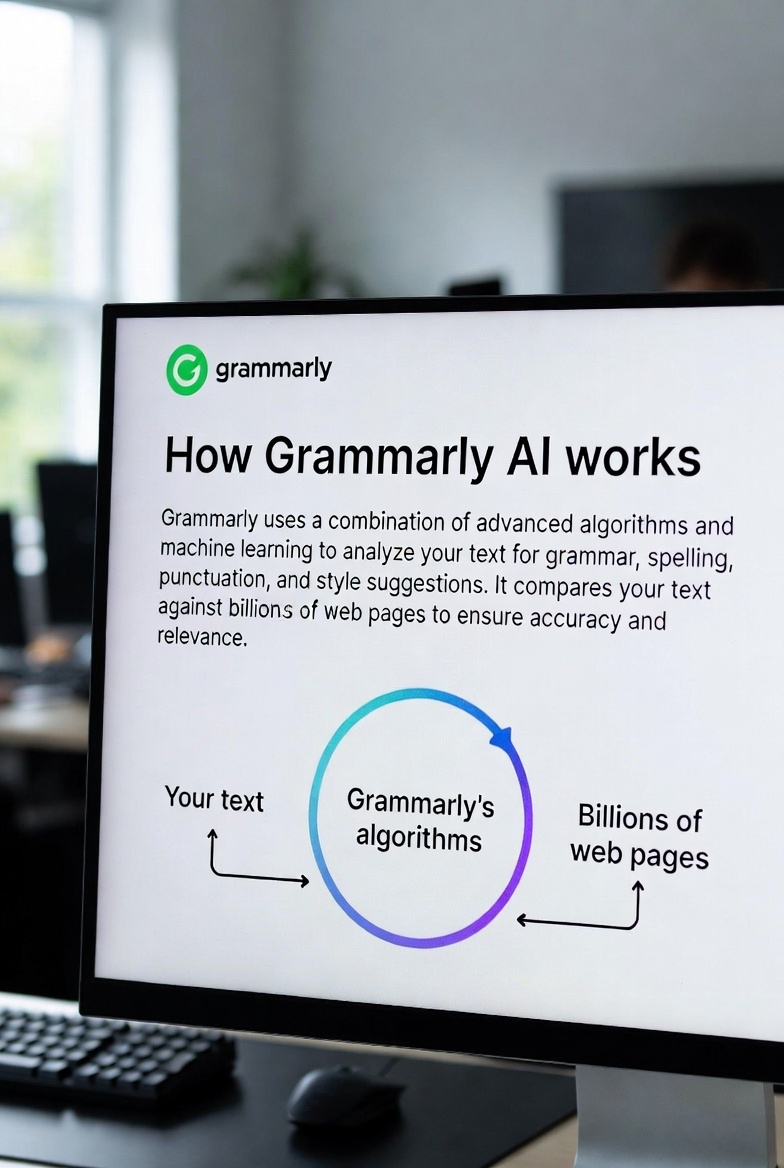
Grammarly AI helps you write clearly, fix grammar mistakes, and improve tone instantly — so your content always sounds professional and confident.
✍️ Writing Preview
We’ve all been there — typing a message, reading it again, and still not feeling confident about it. Whether it’s an email, a message, or something important, the fear of making mistakes is real.
That one email you don’t want to mess up — to your boss, a client, or a company. Grammarly helps you write it clearly, professionally, and with confidence.
You’ve done the hard work, but small mistakes can still affect your impression. Grammarly helps make your writing clean, clear, and easy to understand.
When you’re applying for a job, every word matters. Grammarly helps you present yourself professionally without second-guessing.
Even simple messages matter — clarity avoids confusion. Grammarly ensures your message says exactly what you mean.
Whether it’s blogs or social media, good writing builds trust. Grammarly helps your content feel polished and professional.
In business environments, clear communication is everything. Grammarly helps you sound confident and professional every time.
The truth is, most people don’t struggle with ideas — they struggle with expressing those ideas clearly.
That’s where Grammarly makes a real difference. It doesn’t just fix your writing — it gives you confidence in what you’re trying to say.
Compared to tools like ChatGPT AI, which help generate content, Grammarly focuses on improving what you already have. And that’s what makes it essential in everyday life.
Writing has always been a part of our daily lives — emails, messages, assignments, reports, and even social media. But for most people, writing clearly and confidently is not always easy.
You might know what you want to say, but putting it into the right words can feel difficult. Sometimes it's about grammar mistakes, and sometimes it's about tone, clarity, or confidence.
Most people think Grammarly is just a grammar correction tool — but that’s only a small part of what it actually does.
The real challenge in writing is not just fixing mistakes. It’s making your message clear, confident, and easy to understand. That’s where Grammarly becomes valuable.
It helps you express your thoughts in a way that feels natural and professional — without overthinking every sentence.
Grammarly becomes most useful in situations where communication matters the most.
For example, writing a professional email, submitting an assignment, or applying for a job — these are moments where even small mistakes can create a negative impression.
In these situations, Grammarly acts like a second pair of eyes. It catches errors, improves clarity, and helps you sound more confident.
Different AI tools serve different purposes. For example, ChatGPT AI is widely used for generating content, while Google Gemini AI focuses on productivity and integration.
Grammarly is different — it doesn’t replace your writing. Instead, it improves it.
This makes it a tool that fits naturally into your workflow rather than changing how you work.
In the United States, communication plays a key role in both professional and academic environments. Clear writing is often directly connected to opportunities.
Whether it's business communication, emails, or presentations, the ability to write clearly can impact results.
That’s why tools like Grammarly are not just helpful — they are becoming essential.
The real value of Grammarly is not just in correcting mistakes — it’s in building confidence.
When you know your writing is clear and correct, you don’t hesitate. You communicate better, faster, and more effectively.
Over time, this doesn’t just improve your writing — it improves how you express your ideas.
So, is Grammarly AI worth using in 2026?
If writing is a part of your daily life — whether for work, study, or communication — then the answer is yes.
It’s not about replacing your skills. It’s about enhancing them.
Before choosing any AI tool, it’s important to understand both its strengths and limitations. Grammarly AI is powerful, but like any tool, it works best in specific situations.
1. Accurate Grammar and Spell Checking:
Grammarly’s core strength is its ability to detect grammar mistakes, spelling errors, and punctuation issues instantly.
This is especially useful for users who write daily emails, reports, or academic content.
2. Improves Writing Clarity:
It doesn’t just fix mistakes — it rewrites sentences to make them clearer and easier to understand.
This is important for professional communication where clarity matters more than complexity.
3. Tone Detection and Adjustment:
Grammarly analyzes your tone (formal, friendly, confident, etc.) and helps you adjust it depending on your audience.
4. Time-Saving Tool:
Instead of manually proofreading your content, Grammarly automates the process, saving time and effort.
5. Works Across Platforms:
Grammarly integrates with browsers, email tools, and writing platforms, making it easy to use anywhere.
6. Builds Writing Confidence:
Users feel more confident sending emails or submitting work when they know their writing is correct.
7. Ideal for Professionals and Students:
Whether you're writing business emails or academic assignments, Grammarly adapts to your needs.
8. Better Than Basic Tools:
Compared to simple grammar checkers, Grammarly provides deeper insights and suggestions.
9. Complements Other AI Tools:
While tools like
ChatGPT AI
generate content, Grammarly improves and refines that content.
10. Improves Long-Term Writing Skills:
Over time, users naturally learn from Grammarly’s suggestions, improving their own writing ability.
1. Limited Free Version:
The free version covers basic grammar, but advanced features like tone improvement and rewriting require a premium plan.
2. Not a Full Content Generator:
Grammarly is not designed to generate full content like
Google Gemini AI
or ChatGPT. It focuses on improving existing text.
3. Sometimes Over-Corrects:
In some cases, Grammarly may suggest changes that alter the original tone or intent.
4. Requires Internet Connection:
Grammarly works online, so you need an active internet connection to use it.
5. Premium Cost for Advanced Features:
The full power of Grammarly comes with a subscription, which may not suit all users.
6. Limited Context Understanding:
While Grammarly is smart, it may not always understand complex or creative writing contexts perfectly.
7. Not Ideal for Highly Technical Writing:
In technical or specialized fields, some suggestions may not always be accurate.
8. Dependency Risk:
Some users may rely too much on Grammarly instead of improving their own writing skills.
9. Privacy Concerns:
Since Grammarly processes your text, some users may have concerns about data privacy.
10. Not a Complete AI Solution:
Grammarly works best as part of a larger AI workflow rather than a standalone solution.
If you explore more tools in our AI Tools directory, you’ll notice that Grammarly has a very specific role — improving communication.
It doesn’t try to do everything. Instead, it focuses on doing one thing extremely well: making your writing better.
Understanding this helps you use Grammarly effectively without expecting it to replace other tools.
Think about the last time you hesitated before sending a message. You read it again… and again… and still felt unsure.
Maybe it was an email to your boss, a client, or even something simple — but the fear was the same: “What if this sounds wrong?”
That’s the moment where Grammarly quietly steps in. Not as a tool you actively use — but as something that supports you in the background.
It doesn’t interrupt your flow. It doesn’t make things complicated. It simply suggests better ways to say what you already mean.
Over time, something interesting happens. You stop worrying about mistakes… and start focusing on your ideas.
For example, while tools like ChatGPT AI help you generate content, Grammarly works differently — it improves your voice, not replaces it.
And compared to Google Gemini AI, which focuses on productivity and workflows, Grammarly focuses on something more personal — communication.
In the end, it’s not just about writing better. It’s about feeling confident every time you hit “send.”
Grammarly AI is designed to improve your writing in real time. It checks your grammar, spelling, punctuation, tone, and clarity while you type.
Instead of just showing mistakes, it suggests better ways to write your sentences so they sound clearer and more professional.
Unlike tools like ChatGPT AI, which help generate content, Grammarly focuses on improving what you already write.
This makes it especially useful for emails, documents, and daily communication.
You can use Grammarly as a browser extension, app, or directly on its website.
Just write your content like you usually do — Grammarly works automatically in the background.
Grammarly highlights mistakes and suggests improvements for grammar, tone, and clarity.
You can accept suggestions with one click to improve your writing instantly.
Over time, Grammarly doesn’t just correct your writing — it teaches you how to write better naturally.
Compared to tools like Google Gemini AI, which focus on productivity workflows, Grammarly focuses on improving communication quality.
This makes it one of the most practical tools for everyday use, especially in professional environments.
Grammarly AI is not just a simple grammar checker — it is a complete writing assistant that improves clarity, tone, and communication across different use cases.
| Feature | What It Does | Why It Matters |
|---|---|---|
| Grammar Check | Detects grammar, spelling, and punctuation errors instantly | Ensures your writing looks professional and error-free |
| Clarity Suggestions | Rewrites sentences for better readability | Helps readers understand your message easily |
| Tone Detection | Analyzes tone (formal, friendly, confident) | Prevents miscommunication in emails and messages |
| AI Rewrite | Suggests improved versions of sentences | Makes writing more impactful and polished |
| Plagiarism Check | Checks content for originality (premium) | Important for students and professionals |
| Multi-Platform Support | Works on browsers, email, docs, and apps | Allows seamless usage across platforms |
Each feature of Grammarly is designed to solve a specific problem in writing. Instead of forcing users to learn a complex system, it works quietly in the background, improving your text as you type.
For example, while tools like ChatGPT AI help generate content from scratch, Grammarly focuses on refining and enhancing what you already write.
Similarly, compared to Google Gemini AI, which integrates with productivity tools, Grammarly stays focused on improving communication quality.
This makes Grammarly one of the most practical tools for daily use — especially for professionals, students, and anyone who writes regularly.
In fast-paced environments like the United States, where communication plays a major role in success, having a tool that ensures clarity and correctness can make a significant difference.
Most AI tools today try to do everything — generate content, answer questions, automate tasks. But Grammarly takes a completely different approach.
Instead of replacing your work, it improves what you already write. This small difference changes the entire experience.
For example, when you use tools like ChatGPT AI, you often start from scratch. But with Grammarly, you keep your own voice — it just makes it clearer and more effective.
Similarly, compared to Google Gemini AI, which focuses on workflows and integration, Grammarly focuses on communication quality.
This makes it feel less like a tool and more like a writing partner that quietly helps you improve.
Over time, you don’t just rely on Grammarly — you actually become a better writer.
If writing is part of your daily life — whether it's emails, assignments, messages, or professional work — then Grammarly is not just helpful, it becomes essential.
What makes Grammarly different is not just its features, but how naturally it fits into your workflow. You don’t have to change how you write — it simply improves what you already do.
For users who need content generation, tools like ChatGPT AI may feel more powerful. And for productivity-focused workflows, Google Gemini AI offers deeper integration.
But Grammarly focuses on something more fundamental — clear communication.
And in today’s world, where communication can impact opportunities, impressions, and decisions, that’s exactly what makes it valuable.
Grammarly works best as a daily companion — helping you communicate clearly without extra effort.
At the end of the day, Grammarly is not about writing more — it’s about writing better. And that small difference can change everything.
Good writing is not about being perfect — it’s about being clear, confident, and understood. Grammarly helps you achieve that every single day.
Whether you're writing emails, assignments, or professional documents, Grammarly works quietly in the background to make sure your words always make the right impression.
Explore more tools in our AI Tools directory to find what works best for your needs.
Here are the most common questions users ask before using Grammarly AI for writing, emails, and professional communication.
Grammarly AI is a writing assistant that helps improve grammar, clarity, tone, and overall communication.
Yes, Grammarly offers a free version with basic features, while advanced tools require a premium plan.
It analyzes your text in real time and suggests improvements for grammar, clarity, and tone.
They serve different purposes. ChatGPT AI generates content, while Grammarly improves existing writing.
Yes, over time users learn from suggestions and improve their writing naturally.
Yes, it helps students write error-free assignments and improve clarity.
Yes, plagiarism detection is available in the premium version.
Yes, Grammarly supports mobile devices through apps and keyboards.
Grammarly follows standard security practices, but users should review sensitive data usage.
It can suggest improvements and rewrites but is not a full content generator.
Grammarly primarily focuses on English writing improvement.
Yes, it improves professional communication, emails, and reports.
No, Grammarly requires an internet connection to function.
No, it works best alongside tools like Google Gemini AI.
It is highly accurate for grammar and clarity but may not always understand complex context.
Yes, it is one of the best tools for writing professional emails.
Yes, it helps improve clarity and professionalism in resumes.
If writing is important for your work or study, the premium version can be valuable.
Students, professionals, writers, and businesses can all benefit from Grammarly.
Visit our AI Tools directory to discover more tools.